

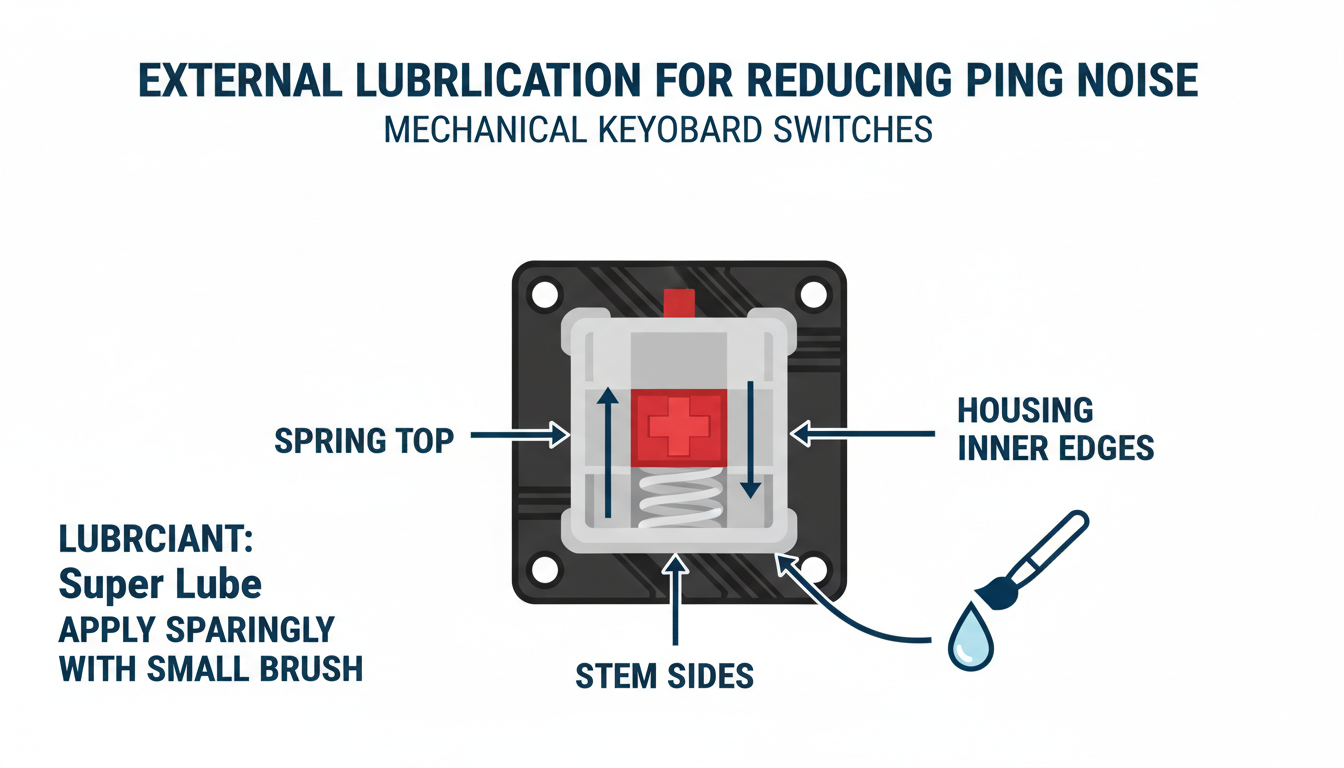
Analysis: Method 1: Targeted Lubrication for Springs and Stems (External Application)
Method 2: Dampening Case Resonance for a Solid Feel
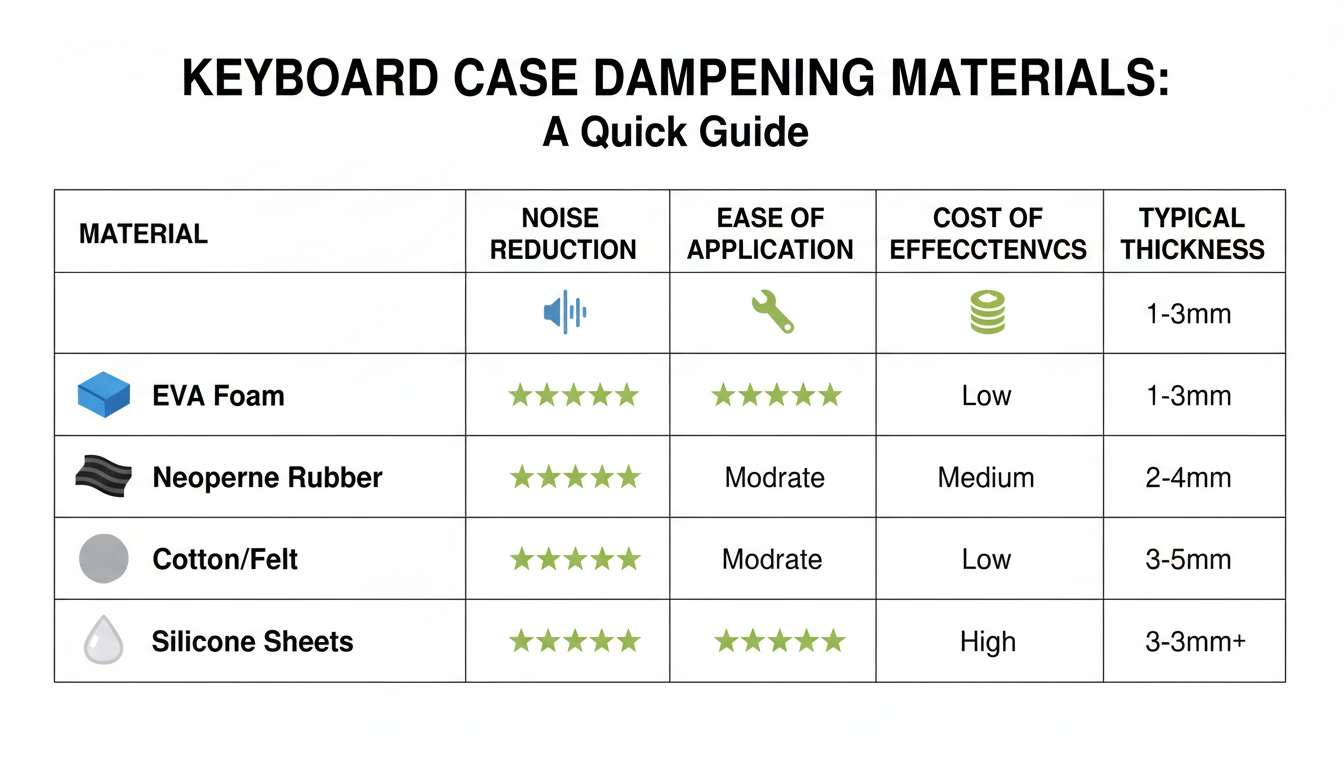
One of the most effective ways to eliminate the K552’s hollow, metallic “ping” is to fill the empty space inside the plastic shell. This void acts as an echo chamber, amplifying unwanted vibrations with every keystroke. By adding dampening material, you can achieve a deeper, more “thocky” sound profile.
Opening the Case: Flip your keyboard over and remove the screws securing the bottom panel. You may need a precision Phillips screwdriver. Gently pry the plastic clips along the edges to separate the bottom case from the plate assembly. Be careful not to pull too hard, as the internal USB cable connects the two halves.
Choosing Your Material:
- EVA Foam / Neoprene: Excellent for absorbing vibrations. Pros: Dense and consistent. Cons: Can be too thick, requiring precise cutting around the USB port.
- Polyfill (Cotton/Pillow Stuffing): The most forgiving option. Pros: Cheap and easily fills uneven corners without putting pressure on the PCB. Cons: Less dense than foam.
- Felt or Shelf Liner: A budget-friendly middle ground that is easy to layer.
Installation Tips: Cut your material to fit the bottom case, ensuring you leave a clear cutout for the USB breakout board and cable routing. If using foam, start with a thin layer (1–2mm) to ensure the case closes flush without bulging or crushing the PCB components.
Analysis: Method 2: Dampening Case Resonance for a Solid Feel
The HTML blog section follows below.
Method 3: Quieting Stabilizers for Long Keys (Band-Aid Mod & Lube)
If your larger keys (spacebar, Shift, Enter, Backspace) sound rattly or clunky, the culprit is likely loose stabilizers hitting the circuit board. While traditional mods require taking the keyboard apart, you can significantly reduce this noise without desoldering using two simple techniques.
1. The “Band-Aid” Mod (No-Desolder Method)
This modification creates a cushioned landing pad for your stabilizer stems, dampening the harsh plastic-on-PCB impact.
- Prepare the material: Cut narrow strips of fabric tape (like a fabric Band-Aid) roughly the width of the stabilizer housing.
- Insert the dampener: Use fine-tipped tweezers to lift the stabilizer stem slightly. Carefully slide the fabric strip under the stem where it would naturally strike the PCB.
- Secure it: Use a small tool to press the tape down firmly onto the PCB surface to ensure it stays in place.
2. External Lubrication
Metal wires rattling inside plastic housings cause high-pitched “ping” sounds. You can fix this by injecting lubricant externally.
- Wires: Use a syringe containing dielectric grease to inject a small amount into the opening where the wire enters the housing.
- Housings: Use a thin brush to apply Krytox 205g0 (or similar) between the inner stem and outer housing walls.
Achieving acoustic perfection is rarely a “one-and-done” process; it requires patience and iterative testing. Instead of reassembling the entire keyboard immediately, test a few keys after each modification. This allows you to isolate specific sources of resonance and determine if your current method is effective or if you need to layer additional solutions to fully eliminate the ping.
If the sound or feel isn’t quite right, you may be facing one of these common pitfalls:
- Over-Lubrication: If your switches feel mushy, sluggish, or lose their tactile bump, you likely applied too much lubricant. To fix this, wipe the stem and housing with a clean brush or ultrasonic cleaner and re-apply a significantly thinner, more even coat.
- Improper Dampening: If the case bulges or the typing feel becomes rigid, your foam is likely too thick or positioned over standoff points. Switch to a thinner material like Neoprene or Polyfill to relieve internal pressure without sacrificing sound absorption.
Ultimately, the goal is a customized sound profile that suits your ears. Don’t be afraid to combine methods—such as pairing spring lubrication with the tape mod—to target different frequencies. By fine-tuning these variables, you will transform that annoying metallic ring into a clean, satisfying “thock” or “clack.”
Conclusion: Enjoy Your Quiet, Customized Redragon K552
By reaching the end of this guide, you’ve likely taken your Redragon K552 from a pingy, hollow echo chamber to a device that sounds and feels surprisingly solid. The combination of case foam, the tape mod, and tuned stabilizers proves that you don’t need a soldering iron—or a massive budget—to achieve a dramatic transformation.
This project serves as a perfect reminder that a ‘premium’ typing experience isn’t strictly reserved for expensive custom kits. It is amazing how much difference a few dollars’ worth of materials and an afternoon of patience can make. By putting in the effort, you have effectively bridged the gap between a budget entry-level board and an enthusiast-grade experience.
Now, take a moment to appreciate the results of your DIY spirit:
- No more metallic ping: The echo is gone, replaced by a dampened, clean sound.
- Solid acoustics: The board should now produce a deeper, more satisfying “thock.”
- Rattle-free typing: Your stabilizers should feel smooth and consistent.
There is a unique satisfaction in typing on a keyboard you modified yourself. Embrace the silence, enjoy the feel, and type away happily knowing you’ve unlocked the full potential of your K552.
FAQ: Your Questions About K552 Ping Noise, Answered
Silencing the metallic ring of a Redragon K552 doesn’t always require a soldering iron, but it does require some know-how. Here are answers to the most common questions about dampening keyboard resonance.
- Will these methods void my warranty?
Most likely, yes. Opening the chassis to install foam or applying lubricants will typically void the manufacturer’s warranty. Always check your specific terms before removing any screws. - Can these techniques be applied to other mechanical keyboards?
Absolutely. The physics of sound remain the same; case dampening works on almost any mechanical keyboard that suffers from hollow plastic acoustics or metal plate resonance. - How long do these fixes last?
Physical modifications, like the foam mod or tape mod, are permanent fixes. If you opt for syringe lubrication to help with switch ping, you may need a touch-up after a year or two of heavy typing. - Is desoldering ever truly necessary for a complete fix?
Only for perfectionists. While desoldering allows you to lube individual springs (the source of specific “spring ping”), filling the case void usually eliminates 80–90% of the audible noise with zero risk to the PCB. - What if the ping persists after trying everything?
If internal dampening isn’t enough, look externally. Placing your keyboard on a thick desk mat can absorb vibrations that would otherwise reverberate through your desk surface.
Conclusion
Fixing the metallic ping on the Redragon K552 Kumara doesn’t require advanced soldering skills or expensive equipment. By addressing the two main culprits—case resonance and spring vibration—you can dramatically improve the sound profile of your keyboard.
Key Takeaways:
- Case Foam is Essential: Filling the hollow cavity with high-density foam (like Neoprene or EVA) is the single most effective step to stop the plastic case from acting like an echo chamber.
- Lube Dampens Resonance: Using the “push-stem” method to lubricate switch springs significantly reduces the high-pitched ringing noise without needing to desolder components.
- O-Rings help the “Clack”: While they don’t fix the ping directly, adding O-rings softens the bottom-out sound, complementing your other mods for a truly silent keystroke.
With patience and the right materials, you can transform the K552 from a noisy budget board into a solid, premium-sounding daily driver.
Frequently Asked Questions
Does opening my Redragon K552 void the warranty?
Technically, yes. Most manufacturers, including Redragon, state that disassembling the product or breaking the “warranty void if removed” sticker will void your coverage. However, in some regions (like the United States), “Right to Repair” laws may protect you if you can prove your modifications didn’t cause the defect. Proceed at your own risk.
Can I use spray lube instead of the brush method?
It is highly discouraged. Aerosol spray lubes are difficult to control and can easily leak onto the PCB, potentially shorting out your keyboard or causing keys to chatter (register double clicks). The “push-stem” method with a brush is much safer and provides more consistent results.
What type of foam is safe to use inside the case?
You should use non-conductive materials to avoid shorting the PCB. Neoprene, EVA foam, Sorbothane, or shelf liner are excellent choices. Avoid packing foam that generates static electricity and never use metal-based insulation like aluminum foil tape directly on the PCB.
Will these mods make the keyboard silent?
They will make it significantly quieter and remove the annoying ringing noise, but a mechanical keyboard will never be purely “silent.” These mods eliminate the metallic resonance and hollow echo, leaving you with the natural sound of the switch and keycap, often described as a solid “thock” rather than a “ping.”
0 comments