
In the relentless pace of the 2024 digital landscape, video isn’t just an option—it’s the currency of attention. Yet, for creators and marketers alike, the bottleneck remains the same: the grueling hours spent scripting, editing, and polishing content to meet professional standards. Enter Invideo AI, a platform promising to shatter these barriers by transforming simple text prompts into fully produced, publish-ready videos in mere minutes. It sounds like the holy grail of content creation, but does the reality actually match the marketing hype?
With the generative AI market saturated with overnight solutions, distinguishing between a genuine productivity powerhouse and a novelty toy is more crucial than ever. In this deep dive, we aren’t just skimming the surface; we’re peeling back the layers of Invideo AI to rigorously test its prompt accuracy, editing flexibility, and overall output quality. Whether you’re a seasoned YouTuber, a swamped social media manager, or a business owner looking to scale without hiring a full production team, read on. By the end of this review, you’ll know exactly whether Invideo AI is the ultimate automation partner to supercharge your content strategy in 2024, or if you should keep looking.
Introduction: The Rise of AI in Video Creation
In today’s digital-first world, the appetite for video content is insatiable. From TikTok shorts to corporate explainers, video has become the dominant language of the internet. Yet, for many creators and businesses, traditional video production remains a significant bottleneck—often characterized by steep learning curves, expensive software, and hours of painstaking editing.
Enter the era of Generative AI. Artificial Intelligence is dismantling these barriers, promising to democratize video creation by turning complex workflows into simple text-based commands. This technological shift is not just about speed; it’s about accessibility, allowing anyone with an idea to become a creator.
Leading this charge is Invideo AI, a tool that positions itself as the ultimate co-pilot for modern content creation. By leveraging advanced language models and media synthesis, it aims to solve the “blank canvas” problem. Key drivers behind its rising popularity include:
- Text-to-Video Automation: Instantly converting scripts or prompts into fully edited videos.
- Cost Efficiency: Drastically reducing the need for expensive stock footage subscriptions and voice actors.
- User-Friendly Interface: Removing the technical complexity of timeline-based editing for beginners.
As we delve deeper into this review, we will examine whether Invideo AI truly delivers on these promises or if it’s just another hype-driven tool in a crowded market.
At its core, Invideo AI is an innovative content creation platform that leverages advanced artificial intelligence to transform simple text inputs into professional-quality videos. It functions as an intelligent production assistant, designed to bridge the gap between a written idea and a visual reality without requiring the user to have technical video editing skills.
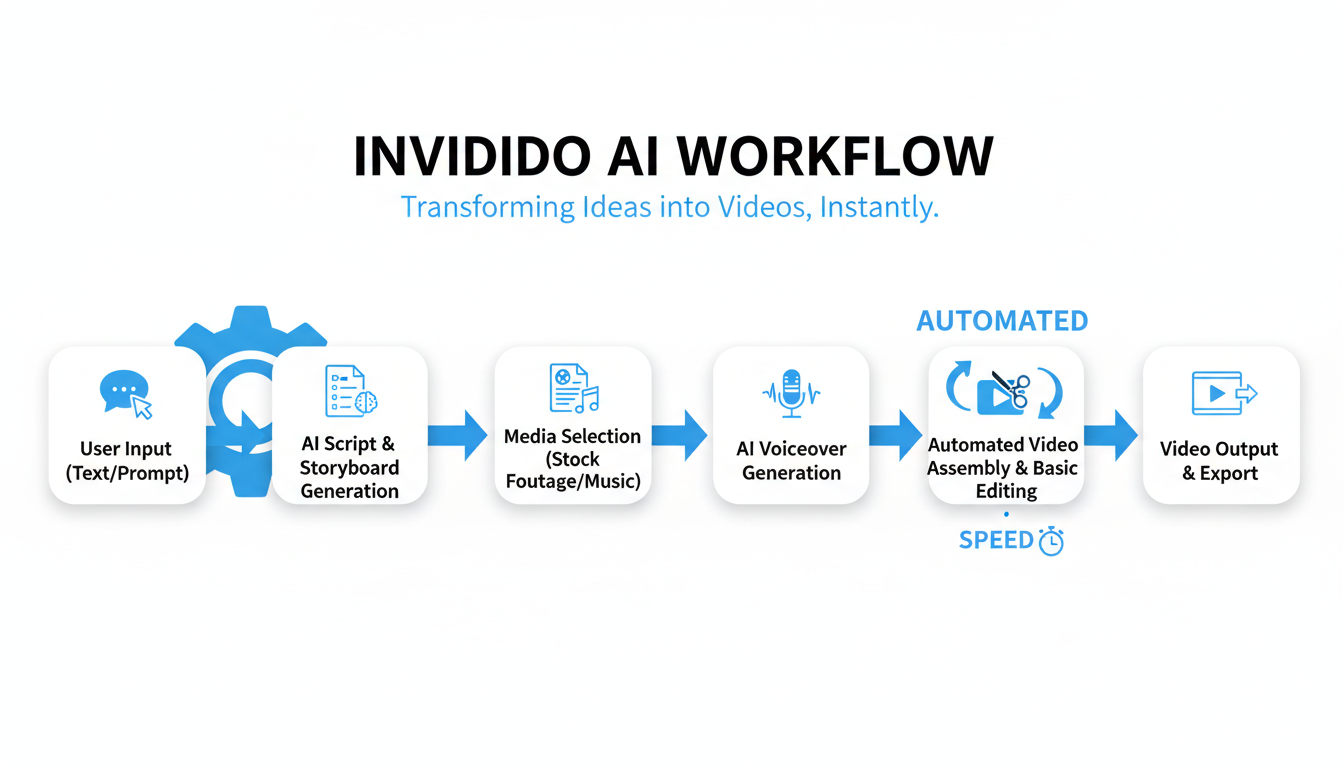
The workflow is designed for maximum efficiency. Whether you input a brief prompt, a full script, or a link to a blog post, the AI handles the heavy lifting through a seamless automated process:
- Script & Storyboard Generation: The AI analyzes your input to create a cohesive narrative structure.
- Media Sourcing: It automatically searches and selects relevant stock footage and images that match the context of each scene.
- Audio Integration: The platform adds background music and generates natural-sounding voiceovers to narrate the content.
By automating these complex tasks, Invideo AI makes video production accessible to marketers, educators, and small businesses. It allows creators to bypass the steep learning curve of traditional editing software, enabling the rapid production of consistent, high-quality video content.
Invideo AI transforms the daunting task of video production into a streamlined, automated workflow. At its core, the platform is designed to interpret your intent and execute it with precision, eliminating the need for complex software or technical skills. By handling the heavy lifting of editing and sourcing, it allows creators to focus entirely on the narrative.
Here is how the engine drives the automation:
- Intuitive Text-to-Video: The standout feature is its ability to turn simple text prompts into fully realized videos. Whether you type a brief idea or a detailed direction, the AI generates a coherent script and storyboard, organizing the narrative logic for you instantly.
- Massive Stock Library: You are never short on visuals. The tool taps into an extensive repository of over 16 million stock photos, videos, and music tracks, ensuring every scene is visually distinct and contextually accurate.
- Human-Like Voiceovers: To bring the audio to life, Invideo AI offers customizable AI voiceovers. You can select the gender, accent, and emotional tone, ensuring the narration fits your brand’s personality perfectly.
- Editing & Export Flexibility: While automation drives the creation, you retain control. Users can issue text commands to edit clips (e.g., “Change the mood to cinematic”) and easily export content optimized for specific platforms like YouTube Shorts, Instagram, or TikTok.
This blend of rapid automation and granular control makes Invideo AI a formidable tool for creators looking to scale their content output without sacrificing quality.
Analysis: Key Features and Functionality: The Power Behind the Automation
Invideo AI is built on the promise of democratizing video creation, and it largely succeeds by stripping away the technical barriers of traditional editing. From the moment you log in, the dashboard feels clean and purpose-built. There is no clutter of complex timelines or intimidating toolbars; instead, the focus is squarely on the prompt input box, inviting users to simply describe their vision.
The user journey is remarkably linear and efficient:
- Prompt-to-Video: Simply typing a topic generates a script, stock media, and voiceover in minutes. The AI handles the heavy lifting, making the “zero to one” process feel almost instantaneous.
- Text-Based Editing: The standout feature is the ability to edit via text instructions. Rather than manually cutting clips, you can type commands like “change the mood to energetic” or “replace the second clip,” and the AI executes the technical adjustments for you.
- Learning Curve: The curve is exceptionally shallow. While granular control is available for those who want to swap specific media assets, the automated process produces usable content with minimal manual intervention.
Regarding performance, video generation and rendering speeds are impressive, typically producing a complete draft in under five minutes. While it may not offer the pixel-perfect precision of high-end software for every single frame, Invideo AI offers an unmatched speed-to-value ratio for creators who need professional-looking content without the steep learning curve.
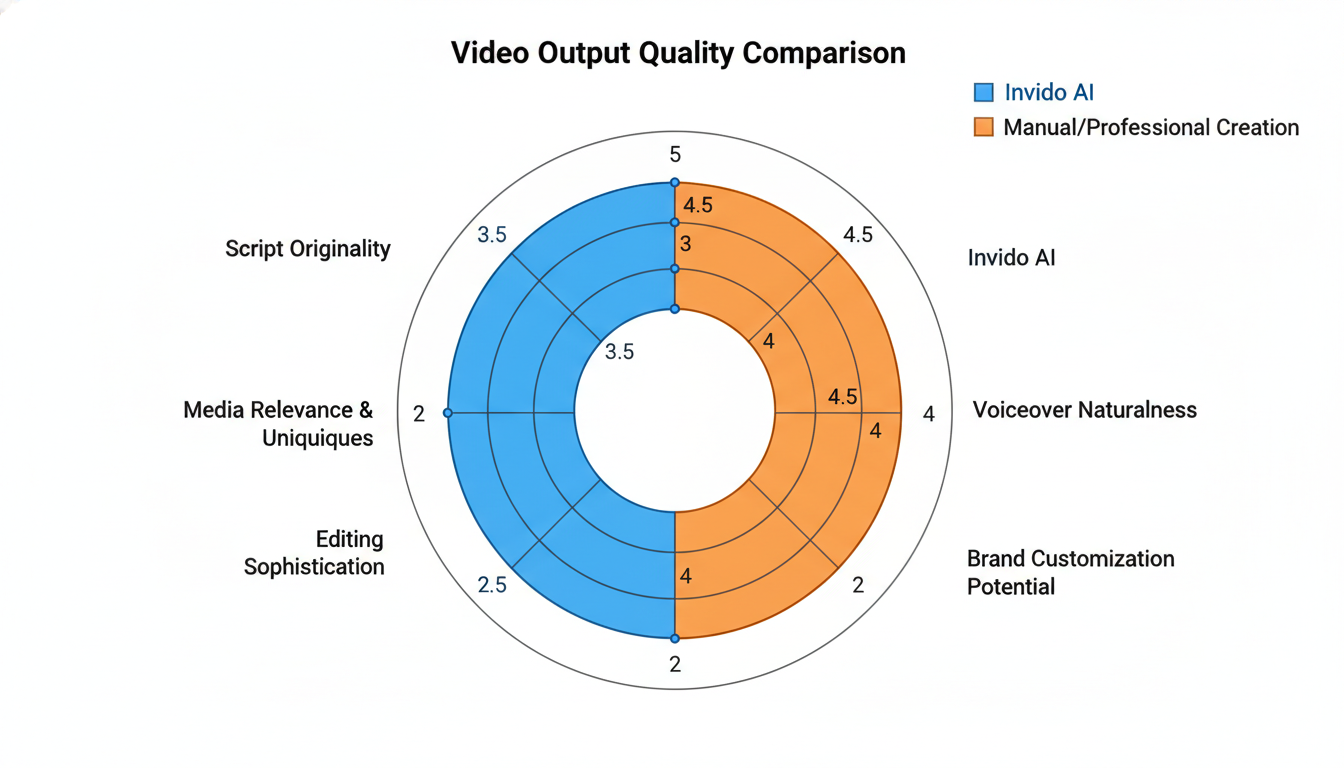
The true test of Invideo AI isn’t just how fast it works, but whether the final export passes as human-made. Generally, the production value is surprisingly high for an automated tool. By tapping into premium stock libraries like iStock and Storyblocks, the platform ensures that the visual fidelity is excellent, even if the AI occasionally selects footage that is metaphorically relevant but contextually slightly off.
When evaluating the “professional” grade of the output, here is the breakdown:
- Audio Quality: The AI voiceovers are among the best in the industry, offering realistic breathing and intonation. However, they can still occasionally lack the specific emotional weight needed for deeply narrative content.
- Script & Flow: The scripts are grammatically coherent and structured well, but often lean toward the generic. Without manual tweaking, the content risks sounding like a “Wikipedia summary” rather than unique thought leadership.
- Editing Precision: Text overlays, transitions, and music synchronization are handled competently, mimicking the rhythm of a professional editor.
Ultimately, Invideo AI produces broadcast-ready content for social media, explainers, and listicles. However, for high-stakes brand campaigns requiring unique emotional resonance, the output can feel somewhat algorithmic without significant human intervention.
Analysis: Performance and Quality of Output: Is it Really Professional?
Understanding the cost structure of Invideo AI is essential for determining if it aligns with your production budget. The platform operates on a freemium model, offering a tiered approach to suit different user needs:
- Free Plan: Ideal for testing the waters. It typically includes 10 minutes of AI generation per week and restricted exports with watermarks. Users get access to standard media but miss out on premium stock assets.
- Plus Plan (approx. $20/mo): Designed for emerging creators. This tier removes watermarks, offers 50 minutes of AI generation, 100GB of storage, and includes 80 iStock media assets monthly.
- Max Plan (approx. $48/mo): Geared towards power users and agencies. It significantly increases limits to 200 AI minutes, 400GB storage, and 320 iStock assets, allowing for high-volume production.
Is it worth it? When compared to traditional video production—where hiring a freelance editor can cost $50–$150 per hour and separate stock footage subscriptions run upwards of $30/month—Invideo AI presents a highly cost-effective solution. Even against other AI tools, its integrated access to premium iStock footage adds unique value, potentially saving users hundreds of dollars in licensing fees alone. For businesses requiring consistent, high-quality video output without the overhead of a production team, the investment in a paid tier is easily justifiable.
Is Invideo AI the ultimate video creation solution? While it revolutionizes content production, it is essential to weigh its strengths against its limitations to decide if it fits your workflow. Here is a balanced look at the automated experience.
The Good
- Incredible Speed: Transform text prompts into publish-ready videos in minutes, drastically reducing production time.
- Beginner-Friendly: No technical editing skills are required; the interface is intuitive and accessible for everyone.
- Cost-Effective: It is significantly cheaper than hiring professional video editors or purchasing expensive, high-end software.
- Vast Media Library: Direct access to millions of stock images and clips ensures you almost never run out of visuals.
- Scalability: It offers consistent output, making it perfect for creators and marketers with high-volume content needs.
The Bad
- Limited Deep Customization: Advanced editors may feel restricted by the lack of granular control over specific effects and transitions.
- Generic Aesthetic: Without manual tweaking, videos can sometimes suffer from a “cookie-cutter” feel common to AI-generated content.
- Occasional Media Irrelevance: The AI sometimes selects stock footage that doesn’t perfectly align with the script’s context.
- Voiceover Nuance: While quality is improving, AI voices can still struggle with specific accents or emotional depth.
- Stock Reliance: The heavy dependence on stock footage can make it difficult to tell truly unique or personalized visual stories.
Invideo AI vs. Competitors: How Does it Stack Up?
The AI video generation landscape is crowded, but Invideo AI distinguishes itself through its ability to generate complete, publish-ready videos from a single text prompt. While tools like Pictory AI excel at converting existing blog posts or long-form videos into short clips, and platforms like Synthesys AI focus heavily on realistic AI avatars for “talking head” videos, Invideo AI takes a different approach.
Invideo AI’s unique selling proposition is its comprehensive automation. It doesn’t just match visuals to text; it writes the script, generates a human-sounding voiceover, selects relevant stock footage, and adds subtitles—all in one workflow.
Here is a quick breakdown of how it compares:
- Best for Speed: Invideo AI wins for users who want to go from a vague idea to a finished video without writing a script first.
- Best for Repurposing: Pictory is superior for turning existing content (like Zoom recordings) into social snippets.
- Best for Avatars: Competitors like Synthesys or HeyGen have the edge if you require a realistic digital human presenter.
Ultimately, if your goal is creating faceless YouTube channels or marketing videos with minimal manual input, Invideo AI offers the most streamlined “prompt-to-video” experience on the market.
Conclusion: Is Invideo AI Your Ultimate Video Automation Solution?
Invideo AI represents a significant leap forward in the world of content creation, democratizing video production for businesses and individuals alike. If your primary goal is to produce high volumes of content rapidly without a steep learning curve or massive budget, the answer is a resounding yes.
This tool shines brightest when applied to scenarios where speed and efficiency are paramount. It is an ideal solution for generating:
- Explainer videos and informational guides
- Quick social media clips (Shorts, Reels, TikToks)
- Cost-effective marketing assets
However, it is essential to manage expectations regarding creative control. While Invideo AI is a powerhouse for scaling production, it does not yet fully replace the nuance and distinct style of a skilled human editor. For truly bespoke, highly branded, or emotionally complex narratives, a human touch remains irreplaceable.
Ultimately, Invideo AI is a strong contender for the “ultimate automation tool” title for creators looking to automate and scale without extensive resources. It offers an impressive balance of power, cost, and usability that makes high-quality video creation accessible to everyone.
Frequently Asked Questions (FAQ)
- Is Invideo AI free to use?
Yes, there is a free plan available that allows you to generate videos to test the platform. However, videos created on the free plan will have watermarks and limited export options. - How do I remove the watermark?
To remove watermarks and access premium features like higher resolution exports and commercial usage rights, you need to upgrade to one of the paid subscription plans (Plus or Max). - Is Invideo AI suitable for beginners?
Absolutely. The platform is designed for ease of use, allowing anyone to create professional-quality videos just by typing a text prompt. No prior video editing experience is required. - Can I use the videos for commercial purposes?
Yes, if you are subscribed to a paid plan, you generally have the rights to use the generated videos for commercial purposes, such as on YouTube, social media, or for client work. - What types of videos can I make?
You can create a wide variety of content, including YouTube Shorts, explainer videos, social media ads, and educational clips, all generated from simple text prompts.
Conclusion
Invideo AI stands out in 2024 as a robust solution for content creators, marketers, and business owners looking to streamline their video production workflow. Its ability to transform simple text prompts into fully realized videos—complete with scripts, voiceovers, and relevant stock footage—makes it a game-changer for those with limited editing experience or tight deadlines.
While it excels at speed and accessibility, it is important to note that the tool is best suited for high-volume, short-form content like social media reels, YouTube Shorts, and promotional clips. Professional video editors may find the customization options slightly limiting compared to traditional software. However, for the majority of users, the trade-off between control and convenience is well worth it.
Key Takeaways:
- Beginner-Friendly: No prior video editing skills are required; the text-to-video interface is intuitive and efficient.
- Time-Saving Automation: Automates tedious tasks like scriptwriting, scene selection, and voiceover synchronization.
- Rich Media Library: Access to millions of stock assets from Storyblocks and Shutterstock (depending on the plan).
- Flexible Pricing: Offers a generous free trial for testing, with scalable paid plans for watermark-free exporting.
Frequently Asked Questions (FAQ)
1. Is Invideo AI free to use?
Yes, Invideo AI offers a free plan that allows you to generate and export videos. However, videos created on the free plan will contain an Invideo watermark and have limited access to premium stock media. To remove the watermark and unlock higher export resolutions, you will need to upgrade to a paid subscription.
2. How much does Invideo AI cost?
Invideo AI typically offers a Plus plan starting around $20–$25 per month and a Max plan for power users starting around $48–$60 per month (pricing may vary based on annual vs. monthly billing). These plans provide more AI generation minutes, premium iStock storage, and unlimited watermark-free exports.
3. Can I upload my own footage and images?
Absolutely. While Invideo AI excels at automatically selecting stock footage, you can easily upload your own images, videos, and branding assets (like logos) to replace any media in the generated video. This is essential for creating personalized brand content.
4. Can I edit the video after the AI generates it?
Yes. One of Invideo AI’s strongest features is its “Magic Box” editor, which allows you to make changes using text commands (e.g., “Change the mood to energetic” or “Replace the background music”). You can also manually edit the script, swap media clips, and adjust timing using the timeline editor.
5. Is Invideo AI good for YouTube videos?
Invideo AI is excellent for creating Faceless YouTube channels, listicles, explainer videos, and YouTube Shorts. Its ability to quickly generate scripts and match them with visuals allows creators to maintain a consistent upload schedule without spending hours on production.
0 comments