
Let’s face it: creating high-quality video content has traditionally been a grueling marathon. Between scripting, hunting for the perfect stock footage, recording voiceovers, and enduring hours of tedious timeline editing, the process is enough to drain the creativity out of anyone. But we are currently witnessing a seismic shift in the digital landscape. The promise of “text-to-video” technology has moved from a futuristic concept to a tangible reality, offering creators the tantalizing possibility of bypassing the grind entirely.
Enter InVideo AI, a heavyweight contender that claims to be the magic wand for YouTubers, marketers, and social media managers alike. It promises to transform simple text prompts into fully produced videos—complete with scripts, visuals, and human-sounding voiceovers—in a matter of minutes. But with the AI market flooded with shiny new tools, does InVideo actually deliver professional results, or is it just another gimmick?
In this comprehensive InVideo AI Review 2026, we are putting the platform through its paces. We’ll explore its features, test its limits, and answer the burning question: Is this truly the ultimate video autopilot that will revolutionize your workflow, or are you better off in the driver’s seat? Let’s dive in.
In today’s digital landscape, video is king. From TikTok scrolls to high-stakes corporate presentations, the demand for visual storytelling is insatiable. Yet, for many creators and businesses, the barriers to entry—time, technical skill, and skyrocketing costs—remain frustratingly high. Enter InVideo AI, a groundbreaking tool designed to dismantle these hurdles and democratize video production for everyone.
At its core, InVideo AI is a sophisticated platform that transforms simple text prompts into fully realized, engaging videos. It automates the heavy lifting by generating scripts, sourcing relevant stock footage, adding voiceovers, and syncing subtitles—promising to turn an hours-long editing slog into a process taking mere minutes. But does the reality match the marketing?
In this comprehensive review, we will dissect the platform to determine if it is the ultimate solution for your creative workflow. We will explore:
- Core Features & Capabilities
- User Experience (UX)
- Pros, Cons, & Limitations
- Target Audience & Value Proposition
Ultimately, we aim to answer the critical question: Does InVideo AI truly deliver on its promise as a “video autopilot” that streamlines the entire production process?
What is InVideo AI and How Does it Work?
InVideo AI is a cutting-edge video generation tool designed to transform ideas into professional-quality videos instantly. By leveraging advanced machine learning, it automates the entire video production pipeline, making high-end content creation accessible to users with zero video editing experience.
The system operates as an intelligent co-pilot. The workflow begins when you enter a simple text prompt, such as a video topic, a rough script, or a URL to a blog post. The AI analyzes this input to understand the context, tone, and audience before executing the following operational steps:
- AI Script Generation: The engine drafts a structured, engaging script tailored to your specified platform (e.g., YouTube, TikTok).
- Intelligent Media Sourcing: It scans a vast library of premium stock footage and images, selecting assets that perfectly align with the script’s keywords and sentiment.
- Voiceover and Assembly: The AI applies a realistic, human-sounding voiceover and synchronizes it with the visuals, adding subtitles and transitions automatically.
Within minutes, InVideo AI assembles these elements into a cohesive initial draft. Users can then make adjustments using simple text commands, streamlining the journey from a blank screen to a finished video.
InVideo AI transforms the complex video production process into a streamlined experience, acting as your intelligent creative partner. By combining advanced generative technology with user-friendly controls, it offers a robust suite of tools designed to elevate your content strategy without the steep learning curve.
- Text-to-Video Generation: Whether it’s a simple prompt, a URL, or a detailed script, the AI engine instantly converts your text inputs into a cohesive video narrative complete with relevant visuals and structure.
- Extensive Media Library: Gain access to a massive repository of over 16 million stock assets. With integration from premium providers like iStock and Shutterstock, you can easily find high-quality footage, images, and music to match any theme.
- AI Voiceover & Narration: Bring your stories to life with ultra-realistic AI voices. Select from a wide variety of accents, languages, and tones to perfectly match the mood of your content.
- Smart Editing & Customization: You maintain full creative control. Use simple text commands to delete scenes, replace footage, reorder segments, or tweak subtitles and transitions effortlessly.
- Brand Kit Integration: Maintain visual consistency by saving your logos, custom fonts, and color palettes, allowing the AI to automatically apply your branding to every video.
- Multi-Platform Export: Maximize your reach by exporting videos in optimized resolutions and aspect ratios—landscape, square, or portrait—tailored specifically for YouTube, Instagram, TikTok, and LinkedIn.
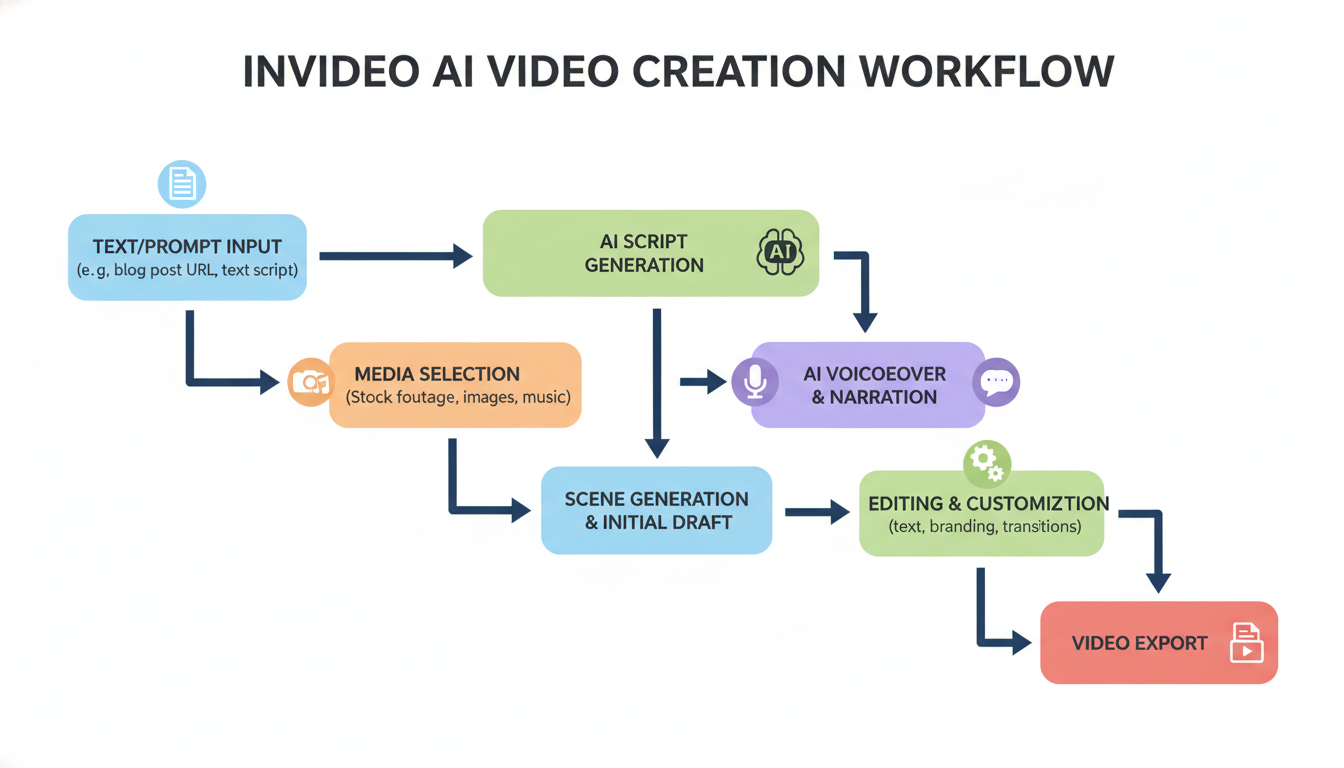
Analysis: Key Features of InVideo AI: Powering Your Video Creation
User Experience and Ease of Use: Getting Started with InVideo AI
The journey from signup to your first video with InVideo AI is designed to be frictionless, prioritizing speed and accessibility. Onboarding is straightforward: users simply create an account and are immediately greeted by a clean, prompt-based interface. For beginners, the learning curve is nearly non-existent—you type a topic or paste a script, and the AI handles the heavy lifting of storyboarding, media selection, and voiceovers.
Key aspects of the user experience include:
- Intuitive “Magic Box” Editing: Instead of complex timeline scrubbing, users can make changes with simple text commands like “make the second scene shorter” or “change the voiceover to a British accent.”
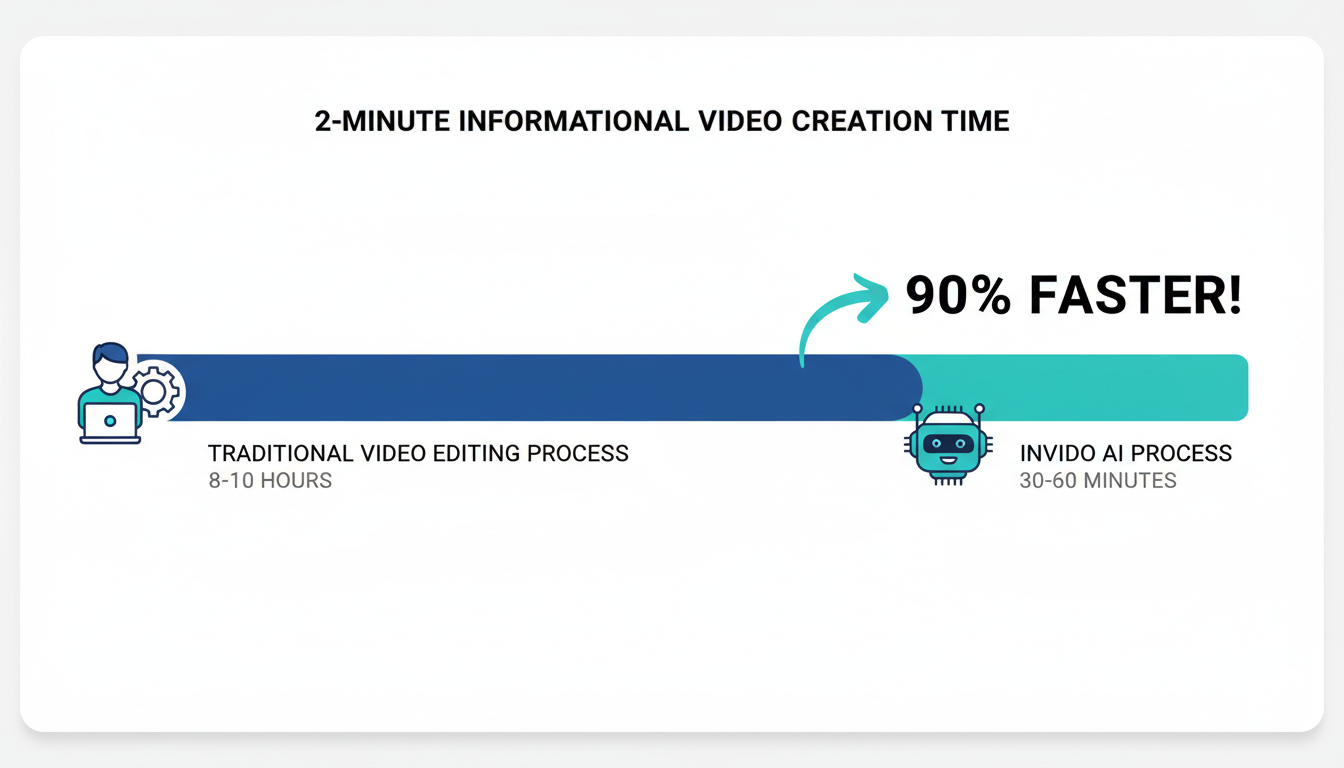
- Rapid Generation: What traditionally takes hours is condensed into minutes. The AI generates a publish-ready draft complete with subtitles and stock footage almost instantly.
- Flexible Control: While the AI automates the initial build, users retain control through a manual editor. You can swap specific media clips, tweak script wording, or adjust timing, offering a solid balance between automated efficiency and creative intervention.
While the interface is a dream for novices, seasoned editors might find the automated workflow slightly restrictive for pixel-perfect adjustments. However, for creating high-volume, professional-looking social content quickly, InVideo AI offers an unmatched blend of power and simplicity.
No tool is perfect, and while InVideo AI is a game-changer for many, it is essential to understand where it excels and where it falls short. Here is a balanced breakdown to help you decide if it fits your workflow.
The Strengths (Pros)
- Efficiency & Speed: The most significant advantage is the time-saving nature of the tool. It is unmatched for mass content creation and rapid ideation, allowing you to go from concept to video in minutes.
- Accessibility: You don’t need a film degree. It creates a low barrier to entry for non-editors to produce professional-looking assets.
- Value: It offers high cost-effectiveness compared to the expense of hiring professional editors or production teams, especially with its included access to a vast media library.
The Weaknesses (Cons)
- Customization Limits: Advanced users may find the interface restrictive, lacking deep, frame-by-frame customization found in traditional software.
- Quality Control: Without manual tweaking, there is a potential for generic-looking content. Additionally, while AI voiceovers are improving, they can still sound robotic compared to human narration.
- AI Reliability: The output is heavily dependent on the quality of initial prompts. Furthermore, AI hallucinations mean script inaccuracies are possible, always requiring a human review before publishing.
Analysis: Pros and Cons: Weighing InVideo AI’s Strengths and Weaknesses
InVideo AI is a game-changer for anyone looking to streamline their video production process, but it shines brightest for those who value speed, consistency, and scalability. Whether you are a solo entrepreneur or part of a creative team, this tool eliminates the steep learning curve and technical barriers of traditional editing software.
Here is a look at who stands to gain the most from this technology:
- Content Creators & Influencers: Ideal for YouTubers, TikTokers, and Instagram marketers who need to maintain a high-volume posting schedule. InVideo AI automates script-to-video creation, allowing creators to produce daily Shorts, Reels, and long-form content without burnout.
- Small Businesses & Marketers: Perfect for generating promotional videos, product explainers, and social media ads on a budget. It allows brands to produce professional-grade visuals instantly without hiring expensive video agencies.
- Bloggers & Writers: A powerful solution for content repurposing. Writers can effortlessly convert existing articles and blog posts into engaging videos to capture traffic from visual platforms like YouTube.
- Educators & Trainers: Excellent for developing visually engaging course materials and instructional guides that retain student attention better than text-heavy slides.
Ultimately, for anyone with limited video editing skills or a tight budget, InVideo AI provides the most efficient path to professional video creation.
Pricing, Plans, and Value: Is InVideo AI Worth the Investment?
InVideo AI simplifies its pricing into three core tiers designed to match different production volumes: Free, Plus, and Max.
- Free Plan: Ideal for testing the waters. It offers 10 minutes of AI generation per week and 4 exports with watermarks. However, it restricts users to standard stock media and prevents commercial use.
- Plus Plan ($20/mo billed yearly): The sweet spot for creators. This tier removes watermarks and unlocks 50 minutes of AI generation per month, unlimited exports in 1080p, and 80 premium iStock assets. It also includes 100GB of storage and 2 voice clones.
- Max Plan ($48/mo billed yearly): Built for agencies and power users. It quadruples the capacity with 200 AI generation minutes, 320 iStock assets, and 400GB of storage, ensuring you never hit a creative wall during high-volume months.
Is it worth it? For businesses, the Plus plan offers the highest ROI, effectively replacing the cost of separate subscriptions for stock footage, voiceover software, and video editors. While the Free plan acts as a capable “sandbox,” serious content marketers will find the watermark removal and premium media access in the paid tiers essential for maintaining brand authority.
Conclusion: Is InVideo AI Your Ultimate Video Autopilot?
After putting the platform through its paces, the verdict is clear: InVideo AI is a transformative tool for the modern creator, but it serves better as a high-speed engine than a fully autonomous driver. It excels at removing the friction from video production, turning simple text prompts into engaging multimedia narratives in mere minutes.
The Final Breakdown:
- The Strengths: It offers unmatched speed and automation. For digital marketers, educators, and “faceless” YouTube channel creators needing a high volume of content, this tool is a game-changer.
- The Limitations: It trades customization depth for ease. While the AI is smart, it requires human oversight to ensure factual accuracy and to fine-tune specific visual choices.
So, is it a true “video autopilot”? Not entirely. It is more of an intelligent co-pilot. InVideo AI gets you 80% of the way there instantly, leaving you to refine the final 20%. If you are willing to embrace that workflow, it is easily one of the most powerful tools available to future-proof your content strategy in this rapidly evolving AI landscape.
FAQs About InVideo AI
Curious about how InVideo AI can fit into your workflow? Here are answers to the most common questions creators ask.
- Is InVideo AI free?
Yes, InVideo AI offers a free plan that allows you to generate videos with watermarks and limited exports (typically 4 per week). To remove watermarks and access premium stock media, you will need to upgrade to a paid subscription. - Is it suitable for complete beginners?
Absolutely. The platform is designed specifically for users with zero video editing experience. You simply type a text prompt, and the AI handles the script, visuals, and editing for you. - How long does it take to create a video?
accurate video generation usually takes just a few minutes. Simple prompts can result in a publish-ready video in under 5 minutes, though detailed customizing will take longer. - Can I use my own media?
Yes. While the AI automatically selects stock footage, you can easily upload your own photos and video clips to replace any scene within the editor. - What languages does it support?
InVideo AI supports over 50 languages, allowing you to create content for a global audience by simply prompting in your desired language. - Can I monetize these videos?
Yes, you have full rights to monetize videos created on the platform on sites like YouTube and TikTok, provided you adhere to the platform’s terms regarding stock media usage. - What kind of support is available?
InVideo is known for its responsive customer service, offering 24/7 live chat support directly within the dashboard, along with an active community and extensive tutorial library.
Conclusion: Is InVideo AI the Future of Content Creation?
As we move further into 2024, the demand for rapid video production is at an all-time high, and InVideo AI positions itself as a formidable contender for the title of “Ultimate Video Autopilot.”
After testing the platform extensively, the verdict is clear: InVideo AI is not just a gimmick; it is a robust productivity tool. While it may not replace high-end cinematic production teams just yet, it effectively automates the 80% of video creation that is usually tedious—scripting, stock matching, and voiceovers. For YouTubers, social media marketers, and educators looking to scale their output without burning out, this tool is a massive asset.
Key Takeaways
- Speed & Efficiency: Generates publish-ready videos from simple text prompts in minutes.
- Magic Box Editing: The ability to edit videos using text commands (e.g., “Make the tone funnier”) is a standout feature for 2024.
- Stock Library: Access to iStock and Storyblocks adds high production value.
- The Trade-off: While impressive, AI voiceovers can sometimes lack human nuance, and specific visual requests may require manual fine-tuning.
If your goal is to dominate the algorithm with consistent, high-quality uploads, InVideo AI is an investment that pays for itself in saved time.
Frequently Asked Questions (FAQ)
Is InVideo AI free to use?
Yes, InVideo offers a free plan that allows you to generate videos to test the AI capabilities. However, videos exported on the free plan will contain watermarks, and you will have limited access to premium stock footage. To remove watermarks and unlock commercial rights, you will need to upgrade to a paid subscription (Plus or Max).
Can I monetize videos created with InVideo AI on YouTube?
Absolutely. If you subscribe to one of the paid plans, you receive a license for the stock media and audio tracks used in your videos. This clears you for monetization on YouTube, Instagram, and TikTok without worrying about copyright strikes, provided you adhere to the platform’s content policies.
Do I need video editing experience to use InVideo AI?
No experience is required. The platform is designed specifically for non-editors. You simply type a topic or paste a script, and the AI handles the cuts, transitions, and media selection. If you want to make changes, you can do so by typing instructions like a chatbot, or by using the intuitive drag-and-drop editor.
Does InVideo AI support multiple languages?
Yes, InVideo AI is a global tool. It can generate scripts and voiceovers in over 50 languages. You can even prompt the AI to create a video in one language and translate it into another instantly, making it excellent for creators targeting international audiences.
0 comments