
Picture this: You are deep into a high-stakes client presentation or a critical team brainstorming session. Suddenly, the neighbor starts drilling, your dog spots a squirrel, or the coffee shop barista turns on the blender. In the era of remote work and hybrid teams, we have all experienced that frantic scramble for the mute button. While working from anywhere offers freedom, the unpredictability of our environments often compromises the professionalism of our communication.
Background noise isn’t just a nuisance; it is a barrier to effective collaboration that disrupts focus and kills momentum. But what if you could create a “cone of silence” around your microphone, regardless of where you are? Enter Krisp, a revolutionary AI-powered utility designed to filter out the chaos of the real world with a single click.
In this comprehensive review, we will explore how Krisp leverages advanced machine learning to eliminate distracting sounds from both your microphone and incoming audio. Whether you are a digital nomad, a sales professional, or an educator, read on to discover if Krisp is the ultimate tool to elevate your virtual meetings and ensure your voice is always heard with crystal-clear precision.
In the shifting landscape of remote work and hybrid meetings, the battle against background noise is constant. We’ve all been there: a critical presentation interrupted by a barking dog, the wail of a passing siren, or the rhythmic clatter of a mechanical keyboard. These sonic intrusions are more than just minor annoyances; they are notorious productivity killers that can instantly undermine your professionalism and derail the flow of collaboration.
Enter Krisp, an AI-powered noise cancellation utility that promises to silence the chaos of the real world at the push of a button. But does it effectively bridge the gap between a bustling coffee shop and a soundproof studio? In this deep dive, we move beyond the marketing hype to evaluate if Krisp is truly the silver bullet for online audio.
Throughout this review, we will examine:
- The Technology: How Deep Neural Networks identify human speech vs. unwanted noise.
- Core Features: A look at inbound/outbound noise cancellation, echo removal, and voice clarity.
- The Verdict: Whether Krisp lives up to its claim as an essential tool for the modern professional.
Join us as we embark on the quest for pristine virtual communication.
What is Krisp? Understanding the Core Technology
At its core, Krisp is not merely a volume filter but a sophisticated layer of Artificial Intelligence designed to separate the human voice from environmental chaos. Unlike traditional noise suppression techniques that rely on simple frequencies, Krisp utilizes advanced Deep Neural Networks (DNN) to analyze audio patterns in real-time.
The technology works by recognizing the unique spectral footprint of the human voice. Having been trained on massive datasets containing thousands of hours of audio—including 20,000 distinct noise types and 10,000 different speakers—the AI has learned to identify speech and filter out everything else. Whether it’s a barking dog, a crying baby, or keyboard clicks, the AI constructs a protective “envelope” around your voice.
Functionally, Krisp operates as a middleware layer within your operating system:
- It creates a Virtual Microphone and Speaker that sits between your physical hardware and your applications.
- It is compatible with any conferencing software, acting as a bridge to clean audio before it reaches apps like Zoom, Teams, or Discord.
Crucially, this architecture prioritizes security. Because Krisp performs all audio processing locally on your device using your CPU or GPU, your voice data never leaves your computer to be processed in the cloud, ensuring absolute privacy and low latency.
Krisp operates as an intelligent “virtual” layer between your physical hardware and your conferencing apps, using advanced AI Deep Learning to process audio in real-time. Rather than simple frequency filtering, the software recognizes the unique characteristics of the human voice, isolating it while aggressively suppressing everything else.
Here is a breakdown of the magic under the hood:
- Bi-Directional Noise Cancellation: Uniquely, Krisp filters audio both ways. It removes noise from your microphone (so you sound professional) and scrubs the incoming audio from your speakers (so you aren’t distracted by someone else’s barking dog or keyboard clicks).
- Echo Removal & Voice Clarity: The AI tackles acoustic challenges instantly, eliminating room echo and reverberation to prevent that hollow “empty room” sound, delivering HD voice quality even in less-than-ideal spaces.
- Speaker Separation: In busy multi-speaker environments, the algorithm distinguishes the primary speaker from background chatter, ensuring the focus remains strictly on the active conversation.
- Universal Compatibility: Krisp integrates seamlessly with over 800 apps, including Zoom, Microsoft Teams, Google Meet, and Slack. It works across Windows, macOS, and iOS by simply appearing as a selectable input/output device in your settings.
User Experience: Setup, Interface, and Ease of Use
Great software shouldn’t just work well; it should be effortless to use. Krisp excels in this regard, offering a polished user journey from the moment you click download.
The Installation & Setup process is refreshingly lightweight. The application installs quickly without complex driver configurations, sitting quietly in your system tray or menu bar within minutes. Once active, the Interface is the definition of minimalist. It avoids feature bloat, presenting a clean, intuitive design where the primary function—noise cancellation—is controlled by a simple toggle switch.
The Integration Process is seamless because Krisp acts as a “virtual layer.” You don’t need to configure it inside the app itself; instead, you simply open your communication tool (like Zoom, Teams, or Slack) and select Krisp as your input and output audio device.
While the default settings work perfectly for most, the Customization Options provide extra control for power users:
- Background Voice Cancellation: Distinguishes between the primary speaker and background chatter.
- Echo Cancellation: Eliminates room echo, perfect for untreated home offices.
- Widget Mode: Keeps essential controls floating on your screen for easy access during calls.
Performance & Effectiveness: Real-World Test and Impact
We put Krisp through a series of rigorous real-world scenarios, ranging from a bustling coffee shop to a home office with a mechanical keyboard and a barking dog. The results were consistently impressive, validating its reputation as an industry leader.
In terms of Noise Reduction Quality, Krisp excels at identifying and silencing non-human frequencies. It effectively eliminated background chatter, traffic sounds, and clicking without aggressive gating. regarding Voice Quality, while the clarity is generally excellent, we did notice slight robotic artifacts (voice compression) during moments of extreme background noise. Despite this, the voice remains intelligible and far superior to raw audio.
Technically, the software is surprisingly lightweight. Our tests showed minimal impact on Resource Usage, with low CPU overhead and zero perceptible latency, making it viable even for older laptops running heavy conferencing apps like Teams or Zoom.
Pros and Cons
- Pros:
- Exceptional bi-directional noise cancellation (filters both your microphone and incoming audio).
- Universal compatibility with any conferencing app (Zoom, Meet, Discord).
- Low latency processing suitable for live calls.
- Cons:
- Occasional “robotic” voice texture during sudden loud noise spikes.
- The free plan is limited (60 minutes/day), and the Pro subscription cost may be a barrier for casual users.
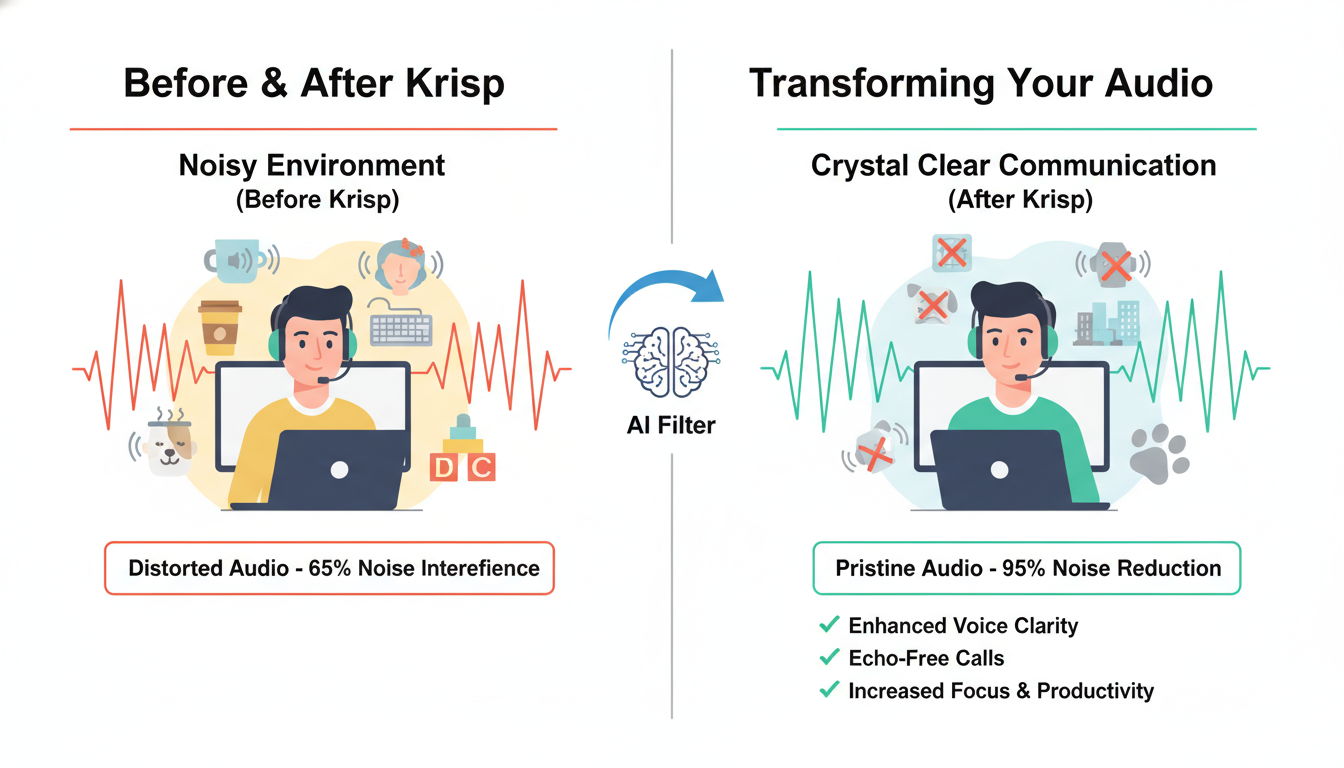
Analysis: Performance & Effectiveness: Real-World Test and Impact
Pricing & Plans: Is Krisp a Worthwhile Investment?
Krisp offers a tiered pricing structure designed to scale from casual individual use to full enterprise deployment. Determining if it’s the right investment depends on your meeting volume and need for advanced administrative features.
- Free Plan: Ideal for occasional users, this plan includes 60 minutes of noise cancellation per day and unlimited transcription. However, it is limited to two AI meeting notes daily and restricted meeting history, making it less viable for heavy users.
- Pro Plan: At approximately $8/month (billed annually), this is the sweet spot for freelancers and remote professionals. It unlocks unlimited noise cancellation, unlimited AI meeting notes, and centralized billing, ensuring you never run out of clarity during back-to-back calls.
- Business Plan: Designed for teams, this tier adds SSO, SCIM, and advanced admin controls for roughly $15/seat/month. It allows organizations to manage licenses in bulk and enforces security standards across all employee devices.
Value Proposition: For professionals who spend hours in virtual meetings, the cost of the Pro plan is easily justified. The ability to eliminate background noise bi-directionally—ensuring both you and your guests sound professional—adds a layer of polish that free alternatives rarely match. If clear communication impacts your bottom line, Krisp is a necessary tool, not just a luxury.
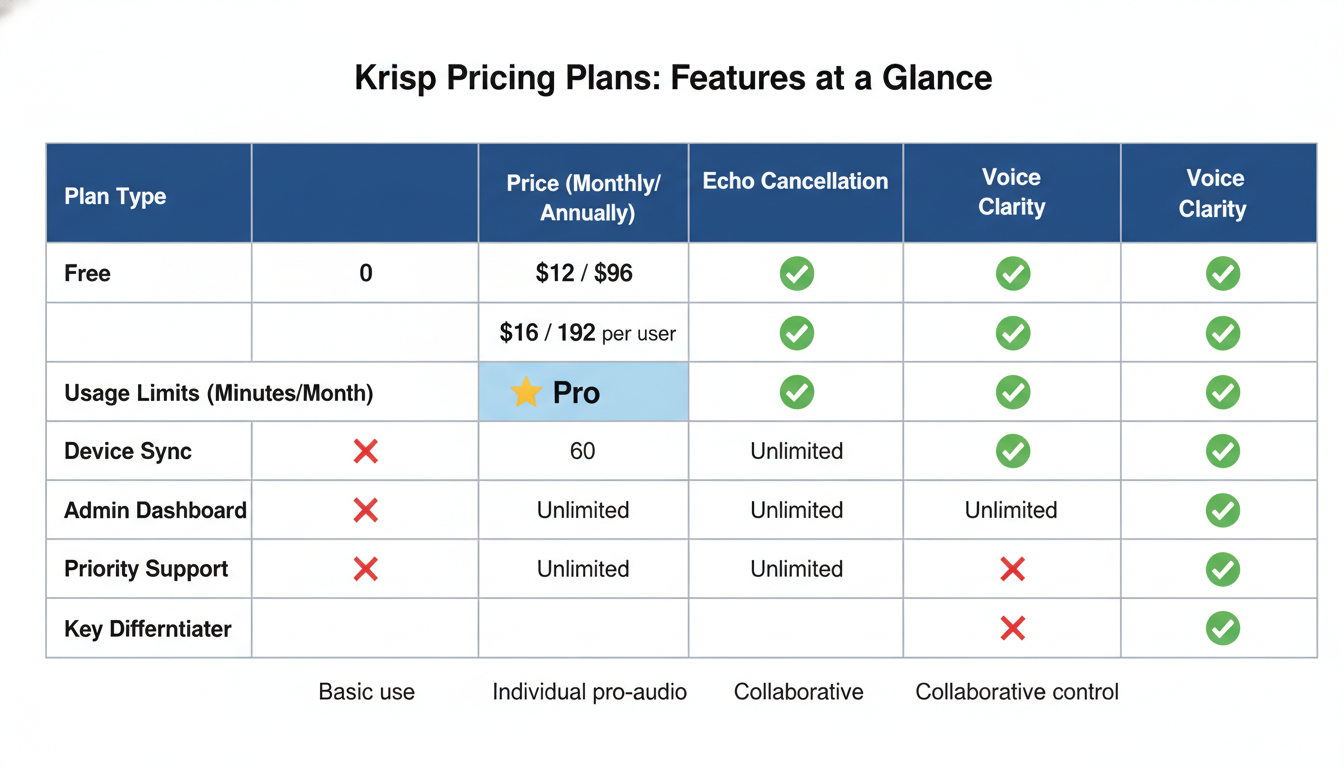
Analysis: Pricing & Plans: Is Krisp a Worthwhile Investment?
In an era defined by virtual connectivity, audio quality can make or break a conversation. While Krisp is a versatile tool for any PC user, specific groups stand to gain the most from its AI-powered noise cancellation technology.
- Remote Workers: The freedom to work from anywhere often comes with unpredictable noise. Whether you are dialing in from a bustling café or a home shared with energetic pets, Krisp allows you to maintain unwavering professionalism regardless of your physical environment.
- Customer Support & Sales Teams: When every second counts, background noise can kill a deal or frustrate a customer. Krisp ensures crystal-clear communication, helping agents build trust and resolve issues faster without the sonic interference of a busy call center.
- Educators & Students: Distractions are the enemy of education. By filtering out household sounds and keyboard clicks, Krisp creates a quiet virtual classroom, which is essential for focused online learning and intelligible lectures.
- Podcasters & Content Creators: Great content needs great audio. Krisp acts as a digital sound engineer, improving audio quality and removing room echo, effectively saving creators the cost of expensive soundproofing equipment.
Ultimately, anyone using VoIP for critical communication—from telemedicine providers to high-stakes job interviewees—will find Krisp indispensable for ensuring they are heard exactly as intended.
While many communication tools have started integrating their own audio filters, Krisp remains a distinct category leader by filling the gaps left by other solutions. Here is how it stacks up against the common alternatives:
- Native App Features (Zoom/Teams): Platforms like Zoom and Microsoft Teams have significantly improved their built-in noise suppression. However, these features are ecosystem-locked. They work well inside their specific app but offer zero protection if you switch to a Slack Huddle, a VoIP softphone, or a browser-based recorder.
- Hardware Solutions: High-end noise-cancelling headphones are excellent at blocking noise for you (Active Noise Cancellation), but they often rely on physical microphones that still pick up background chaos for the person on the other end.
- Other Software: Competitors like NVIDIA Broadcast offer strong suppression but often come with strict hardware requirements, such as needing a high-end RTX graphics card to function.
The Krisp Differentiator: Universal Compatibility
Krisp’s primary advantage is that it sits between your hardware and your applications as a virtual microphone layer. It works with over 800 apps—whether you are gaming on Discord, presenting on Webex, or recording a podcast in Audacity. Unlike the competition, Krisp ensures studio-quality audio across your entire digital workflow without requiring expensive hardware upgrades.
Conclusion: The Verdict on Krisp
After putting the software through rigorous testing, it is clear that Krisp is not just a novelty—it is a vital utility for the modern digital workspace. By effectively eliminating the chaotic soundscape of home offices and coffee shops, it solves the single biggest friction point in remote work.
The software stands out for three primary reasons:
- Powerful AI Engine: It successfully silences distinct distractions, from barking dogs to mechanical keyboards, without making your voice sound robotic.
- Universal Compatibility: It integrates seamlessly with Zoom, Microsoft Teams, Slack, and virtually any other conferencing app.
- Effortless Usability: The “set it and forget it” interface ensures you focus on your meeting, not your tech settings.
While the minutes cap on the free plan may be a constraint for power users, the value proposition for professionals is undeniable. Consequently, for digital nomads, sales representatives, and remote teams, Krisp is a ‘must-have’ tool. It acts as an insurance policy against audio embarrassment, ensuring that your message—and not your background noise—is exactly what gets heard. By removing the mental load of worrying about your environment, Krisp significantly boosts both communication quality and daily productivity.
FAQ: Your Questions Answered About Krisp
If you are still considering integrating this tool into your daily workflow, here are the answers to the most common questions users ask regarding functionality and privacy.
- Is Krisp safe to use?
Absolutely. Privacy is a top priority for Krisp. All audio processing happens locally on your device, meaning your voice data never leaves your computer or gets stored on any cloud servers. - Does Krisp work with all communication apps?
Yes! Krisp acts as a “virtual layer” between your hardware and software. It works seamlessly with over 800 apps, including industry leaders like Zoom, Microsoft Teams, Discord, and Google Meet. - Can Krisp cancel music or other voices?
Krisp is designed to mute non-human background noises (like traffic or typing). However, it also features Background Voice Cancellation, which specifically filters out other people talking in the same room so only the primary speaker is heard. - Does Krisp affect my internet speed?
No. Since the AI processing is handled by your computer’s processor (CPU), it does not use your bandwidth or introduce lag to your internet connection. - Is there a free trial for the Pro version?
Krisp creates a Free plan that offers limited noise cancellation minutes daily. They also typically offer a trial period for their Pro plan so you can experience unlimited usage. - What are the minimum system requirements?
Krisp is lightweight but requires Windows 10/11 (64-bit) or macOS 10.14 (Mojave) or newer to function correctly.
Conclusion
Krisp stands out as an essential tool for modern professionals who rely on virtual communication. By effectively eliminating background noise and echo from both ends of a call, it ensures that your meetings remain professional and distraction-free, regardless of your physical environment.
Beyond simple audio clarity, Krisp has evolved into a comprehensive meeting assistant. Features like AI-powered transcription, automatic meeting summaries, and bot-free recording significantly boost productivity by allowing you to focus on the conversation rather than note-taking. Its compatibility with every major conferencing platform—including Zoom, Microsoft Teams, and Google Meet—makes it a versatile addition to any software stack. Whether you are a remote worker, a digital nomad, or part of a global team, Krisp offers a reliable solution to elevate the quality of your virtual interactions.
Frequently Asked Questions (FAQ)
1. Is Krisp free to use?
Yes, Krisp offers a free plan that includes a daily limit of noise cancellation minutes and a limited number of meeting transcriptions per day. For unlimited usage and advanced features, you can upgrade to their Pro plan.
2. Does Krisp work with Zoom, Teams, and Google Meet?
Absolutely. Krisp acts as a “virtual microphone” and “virtual speaker” layer between your hardware and your software. This means it works seamlessly with Zoom, Microsoft Teams, Google Meet, Slack, Discord, and virtually any other conferencing or recording application.
3. Is Krisp safe and private?
Privacy is a core feature of Krisp. All voice noise cancellation processing is done locally on your device, meaning your audio data does not leave your computer. For features like transcription that require cloud processing, data is encrypted and handled with strict security standards ensuring your conversations remain confidential.
4. Can I use Krisp on my mobile phone?
Yes, Krisp offers a mobile app for iOS and Android. While the desktop version is known for real-time noise cancellation during live calls, the mobile app focuses on joining meetings to record and transcribe them, as well as providing noise cancellation for mobile calls on supported devices.
5. What does “bot-free” recording mean?
Unlike other AI meeting assistants that must join your call as visible participant (a “bot”) to record, Krisp records the audio directly from your device’s system. This allows for a discreet recording experience without cluttering the meeting participant list.
0 comments